
How to Automate GMB Posts in 2026
Posting to Google Business Profile every week works. Doing it by hand across several locations does not last. Here is the 7 step process to put it on a schedule, plus the 1 rule about post expiry that most guides still get wrong.
 Amit GuptaFounder, 12 years in local SEO. Updated 11 September 2026
The short answer
To automate GMB posts, connect your Google Business Profile to a scheduling platform, build a content calendar, then set posts to publish on a recurring schedule. In GBPPromote that is 7 steps from the dashboard: click Manage, go to Post, toggle auto post on, then set the frequency, topic method, media method and review approval. It also publishes your 5 star reviews as posts automatically, which solves the hardest part of posting. Setup takes about 10 minutes and runs until you change it.
Do GMB posts still expire after 7 days?
No. Google removed the 7 day expiry in January 2021. Standard update posts now stay visible on your profile and are archived after about 6 months. Only Event and Offer posts expire, and they expire on the end date you set yourself.
| Post type | How long it stays | What that means for your schedule |
|---|---|---|
| Update, or What’s New | Stays visible, archived at about 6 months | You are building a feed, not replacing a disappearing post. Older posts still show |
| Event | Until the end date you set | Schedule it to publish ahead of the event, not on the day |
| Offer | Until the end date you set | Set the date range deliberately. An expired offer sitting live looks worse than no offer |
| Product | Stays in the product section | Treat as a catalogue rather than a post schedule |
You can check this yourself on any active profile. Scroll the updates section and you will see posts from months ago. Google’s own help documentation on Business Profile posts covers the current post types and what each one requires.
Why automate GMB posts at all?
Posting is not hard. Posting every week for 2 years across 12 locations is hard, and that is where almost everyone stops.
- It survives holidays and staff turnover. A manual routine dies the first busy month
- It scales without more people. Writing 1 post and publishing to 40 profiles takes the same time as writing 1 post
- It keeps the profile visibly active, which is what a customer sees when they land on your listing from Search or Maps
- It frees the time for the posts that need a human, which is the real argument
- It gives you a record. You can see what published, when, and whether anything moved
The honest limit: posting is not a ranking factor Google has confirmed. A regularly updated profile signals an active business and posts give you space to use the terms customers search, but treat any claim that posting alone lifts your map position with caution. Track it with a rank scan rather than assuming it.
The 4 post types, and what each needs
| Type | Use it for | Required fields | Expires |
|---|---|---|---|
| Update | General announcements, service highlights, staff news, hours changes | Description. Image optional but recommended | No |
| Event | Openings, workshops, seasonal dates, anything with a time | Title up to 58 characters, start and end date and time | On the end date |
| Offer | Discounts and promotions | Title, date range. Can add a coupon code, redemption link and terms | On the end date |
| Product | Items or services with a price | Name, price range, description | Stays in products |
1,500 characters is the description limit, but only about 100 characters preview before the text truncates. On Google Maps the preview is shorter still, closer to 100 to 150.
So the first line is the post. Put the offer, the date or the reason to click in the opening sentence and treat everything after it as detail for people who tap through. Writing 1,400 characters of beautiful copy that nobody sees past the first line is the most common waste of effort here.
Images: around 1200 by 900 pixels, 4:3 ratio, JPG or PNG. Every CTA button option is available across the types: Book, Order online, Buy, Learn more, Sign up and Call now.
How to automate GMB posts: 7 steps
This is the exact process in GBPPromote, with a screenshot at every step. The whole setup takes about 10 minutes and runs until you change it.
Step 1: Open the dashboard and click Manage
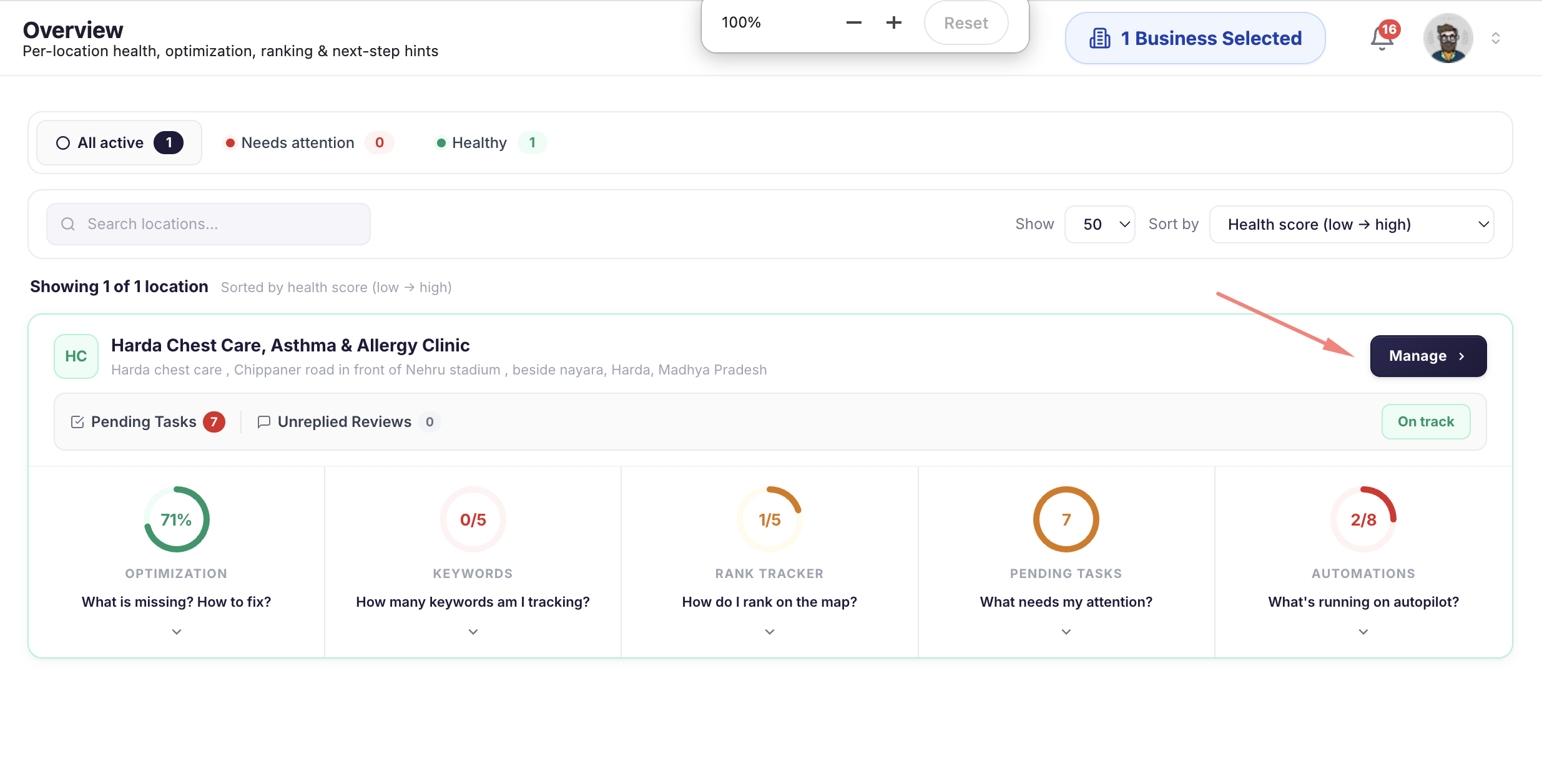
Sign in and you land on the dashboard listing your connected profiles. Click Manage on the location you want to automate.
If a location you expected is missing, it is not connected yet. Profiles owned by a different Google account, or ones still unverified, will not appear. Fix that first, because a schedule cannot publish to a profile the platform cannot see.
Step 2: Go to Post

Open the Post section. This is where both manual posts and the automation settings live, so you can publish something now and set the recurring schedule from the same screen.
Step 3: Toggle auto post on, or click Configure

Switch auto post on, then click Configure to set how it behaves. The next 4 steps are all inside that configure screen.
Step 4: Select post frequency

Choose how often posts publish. Once a week is the minimum worth doing. 2 to 3 times a week is a good target.
Resist setting it daily. Since posts no longer expire, daily posting builds a feed nobody wants to scroll, and thin content published often is worse than good content published weekly. You can always increase it after a month if you have enough to say.
Step 5: Select topic method

This decides what the posts are actually about. There are 3 options.
| Topic method | What it does | Use it when |
|---|---|---|
| AI topic and queue | AI generates a set of topics from your business and queues them up | You want a running calendar without planning one. Best starting point for most businesses |
| Your own topic | You enter the topics yourself | You have a promotion calendar, seasonal trade, or specific services to rotate through |
| Auto topic | Topics are chosen automatically | You want it fully hands off and the content is general rather than campaign driven |
Step 6: Select media method

Posts with an image get looked at. Posts without one look like a notice. There are 4 options.
| Media method | What it does | Use it when |
|---|---|---|
| None | Text only posts | Rarely. Only if you genuinely have no usable photos |
| AI Generate | Creates an image for each post | You have no photo library and need something visual now |
| Media Queue | Works through a set of images you upload | You have real photos of your own work, which always beat generated ones |
| Queue Rotation | Cycles through the queue so images repeat in a pattern rather than running out | Multi-location setups. Stops every branch publishing the same photo on the same day |
There is also a toggle to use your GBP Gallery directly. Turn that on and the automation pulls from photos already on your Google profile instead of making you upload them again. If you have been adding photos to your profile for years, that is a library you already own.
Step 7: Turn on 5 star reviews as posts, and set approval

This is the setting most people miss, and it is the best one here. Switch it on and your 5 star reviews get published as posts automatically.
It solves the hardest part of posting, which is having something to say. A happy customer already wrote it. You are turning social proof into profile content with no writing at all, and a post quoting a real customer reads better than anything a template produces.
Then choose auto approve or manual. Auto approve means reviews publish as posts with no intervention. Manual means each one waits for you to say yes.
Stay on manual permanently if you are in a regulated trade, or if reviews sometimes name staff, mention prices or describe specifics you would not want repeated as marketing copy. The point of offering both is that full automation is not right for every business.
That is the setup
Once those 7 are set, posts publish on your chosen rhythm, with topics generated or queued, images attached and your best reviews going out as content. Nobody logs in to make it happen.
Then run a geo-grid rank scan before you start and again after 8 weeks, so you know whether posting is moving your map position or just keeping the profile current.
Posting across many locations at once
Google lifted the restriction on chains bulk posting in 2020, so multi-location brands and franchises can publish across many profiles from 1 action. Before that, businesses with more than 10 locations could not post automatically at all.
| What you need at scale | Why it matters |
|---|---|
| Write once, publish to a group | The whole point. Writing 40 posts by hand is the thing you are trying to stop doing |
| Per location detail substitution | Address, phone, staff name or offer swapped in automatically, so posts are not word for word identical |
| Location groups | A seasonal offer in 1 region should not publish in another where it does not run |
| Role based access | A branch manager posts about their own location without touching brand fields |
| A record of what published where | When head office asks why a branch posted something, you need the log |
The multi-location dashboard handles the grouping and bulk publishing, and franchise setups add per franchisee permissions so a local manager can post without brand-critical fields being editable.
What to automate, and what to write yourself
Automate the rhythm. Write the moments. A setup that automates everything produces a profile nobody wants to read.
Automate these
- Service highlights on rotation, so every service gets airtime across a quarter
- Seasonal reminders tied to your trade, booked months ahead
- Recurring offers that genuinely run every month
- Opening hours changes for known holidays
- Photo and video dripfeed alongside the post schedule
- 5 star reviews republished as posts, which is free content you did not write
- Anything you would otherwise skip, which is most of it
Write these yourself
- Anything reputational. A response to a local incident or a complaint that went public
- Genuine announcements. A new location, a new owner, an award
- Anything time sensitive where being a day late makes it wrong
- Posts naming a person, because tone matters and a template will get it wrong
- Anything legal or medical, where precise wording is not optional
- The first month of posts, so you learn what your customers respond to before you template it
How often should you post?
Once a week is the floor. 2 to 3 times a week is a good target. Consistency beats volume.
A steady weekly post for a year does more than 20 posts in January followed by silence until June. Google sees a pattern of activity, and more importantly a customer landing on your profile in August sees something from August.
6 mistakes to avoid
| Mistake | The fix |
|---|---|
| Identical text across every location | Substitute local details so each post is specifically about that branch |
| Burying the point past 100 characters | Lead with the offer, the date or the reason to click. The rest is detail |
| Automated Offer posts with stale dates | Use Update posts for recurring automation. Save Offers for real date ranges |
| Never checking the live profile | Verify manually after the first cycle, then spot check monthly |
| Posting because posts expire | They do not. Post because the feed is what customers read |
| Keyword stuffing the post text | Write for the customer. A post that reads badly converts badly whatever it ranks for |
Tools that automate GMB posts
| Tool | Best for | Posting features | Price |
|---|---|---|---|
| GBPPromote | Automating posts alongside the rest of local SEO | Scheduling, AI topic queue, 4 media methods, 5 star reviews published as posts, auto or manual approval, bulk publishing. All on every plan | $16 for 1, $5.33 from 8 |
| Local Viking | Bulk posting across many client profiles | Spintax, so each location publishes a variation, plus daisy chaining and geo-tagged media | From $39 for 1 listing |
| SOCi | Franchises needing social and paid alongside profile posts | Content libraries franchisees pull from, localised campaigns, corporate approval | Quote based |
| Semrush Local | Teams already on Semrush | Posting inside the wider SEO platform | Add-on, verify |
| Uberall | Enterprise multi-location | Localised social publishing with brand templates | Quote based |
Prices verified where published. Rows marked verify or quote based need confirming with the vendor. Local Viking’s spintax is genuinely ahead of most posting tools, and worth knowing about if varied bulk posts are your main requirement.
Frequently asked questions
How do you automate GMB posts?
Do GMB posts still expire after 7 days?
Can you schedule Google Business Profile posts in advance?
How often should you post on Google Business Profile?
Can you post to multiple Google Business Profiles at once?
What is the character limit for a GMB post?
What are the GMB post types?
Should you automate every GMB post?
Does posting on Google Business Profile help rankings?
What is the best tool to automate GMB posts?
Can you automate GMB posts for free?
Can you turn Google reviews into Google Business Profile posts?
Where do the images in automated posts come from?
Stop writing the same post 40 times
Click Manage, open Post, toggle auto post on. Set the frequency, pick how topics and images are chosen, and switch on 5 star reviews as posts. About 10 minutes, then it runs. Check a live profile after the first cycle, because that is the habit that catches everything.
$16 for 1 location, $37 flat for 2 to 7, $5.33 each from 8 up. No credit card required
On the 7 day expiry. Google removed it in January 2021. Standard update posts now stay visible and are archived at about 6 months, while Event and Offer posts expire on the end date you set. The 7 day claim is still repeated widely, including in articles published this year, and it changes how people build a posting schedule, which is why it leads this guide.
On the specifications. Character limits, image sizes and call to action options were checked against current published guides in September 2026. They are not taken from Google directly and Google changes them, so confirm against the official help documentation before relying on an exact figure.
On ranking claims. Posting is not a ranking factor Google has confirmed. A regularly updated profile signals an active business and posts give you space to use the terms customers search, but anyone promising that posting alone lifts your map position is overselling. Measure it with a rank scan before and after rather than assuming.
On the products named. GBPPromote is our own platform. Google, Google Maps and Google Business Profile are trademarks of Google LLC. All other product names belong to their respective owners.